⚡ Keymatic Windows
Macro buttons that send keystrokes straight to any window — even minimized. Each button targets the exact windows you choose, runs in the background, and fires on a global hotkey.
Quick links
If you just want copy & paste, go to Examples.
⬇ Download
Download the latest Windows version from GitHub:
Try another browser or right-click → "Open link in new tab".
✨ Features
- Send keys in the background — works minimized
- Multi-window — one macro can control multiple windows
- REPEAT / LOOP — automate repetitive tasks
- Configurable delays — fine timing (ms)
- Global hotkeys — start/stop from anywhere
- Parallel WAIT — scheduled tasks alongside the main loop
- Multi-column layout — auto second column when buttons overflow
- Drag & drop reorder — rearrange buttons by dragging
📥 Installation
- Download the installer from GitHub Releases
- Run the installer and follow the steps
- Launch Keymatic.exe
If an app blocks input, try running Keymatic as Administrator.
🖥️ Interface
Minimal and compact — macro buttons on one side, quick controls on the header and footer. When you create many buttons, a second column opens automatically.

| Element | What it does |
|---|---|
| Logo (⚡) | Open menu (About · toggle Debug log) — drag the header to move the app |
| ➕ Add | Create a new macro button |
| Macro buttons | Left-click: start/stop · Right-click: options menu · Drag out: capture a window · Drag within: reorder |
| − Minimize | Minimize to system tray |
| ✕ Close | Exit the app |
Button right-click menu
| Option | What it does |
|---|---|
| ⚙️ Configure | Edit title, line delay, start hotkey, stop hotkey, and key send method |
| 📝 Edit Script | Open the script editor for this button |
| 🪟 Manage Windows | See all captured windows — start/stop/rename/remove each one individually |
| ❌ Delete Button | Permanently delete this macro button |
Button states
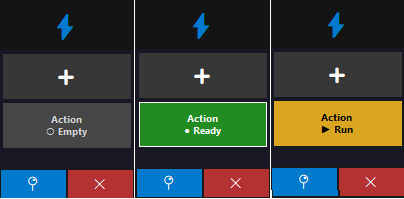
| State | Meaning |
|---|---|
| ○ Empty | No window captured yet |
| ● Ready | Window captured and ready to run |
| ● 2/3 win | 2 of the 3 captured windows are open |
| ▶ Run | Script is running |
| ▶ 2 run | Script running on 2 windows simultaneously |
| ○ Closed | Windows were captured but the target app is closed |
System tray
| Action | What it does |
|---|---|
| Double-click icon | Show or hide Keymatic |
| Right-click → 📌 Show/Hide | Same as double-click |
| Right-click → ❌ Exit | Close the app completely |
🚀 Getting started (step by step)
1) Create a macro button
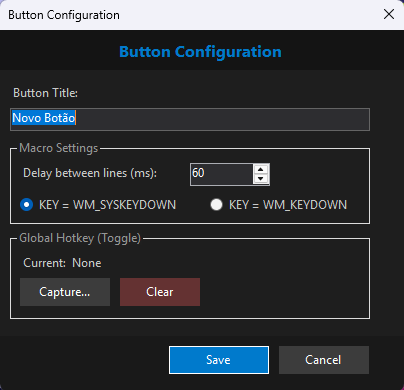
Click ➕ and configure:
- Title (short looks better)
- Line delay (ms) — pause after each command line
- Start hotkey (optional) — global shortcut to start the macro
- Stop hotkey (optional) — separate global shortcut to stop it, useful when your script runs in a loop
- Key send method — PostMessage (default) works for most apps; switch to SysKeyDown if keys aren't registering
2) Capture a window
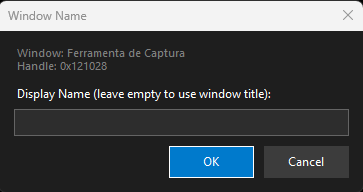
Drag the macro button over the target window and drop it. You can capture multiple windows on the same macro — the script will run on all of them.
Tip: Hold Ctrl while dragging to capture the window and bind it to all buttons at once.
3) Edit the script
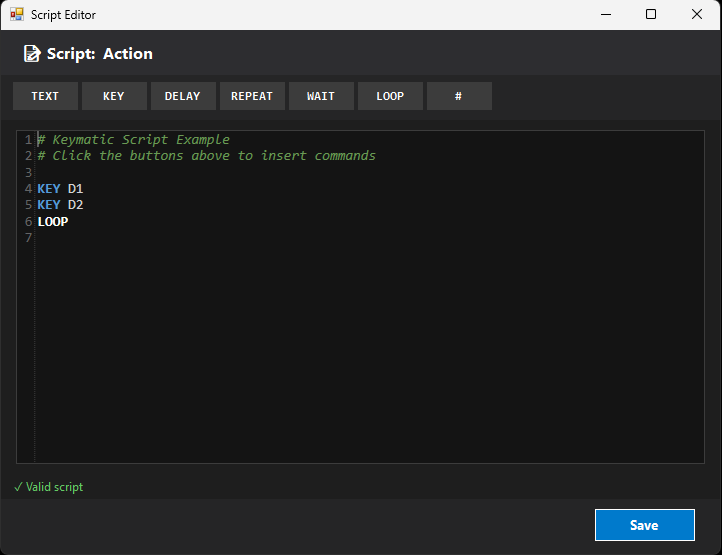
Right-click the macro → 📝 Edit Script
4) Run / stop
Left-click the macro button to start. Click again to stop. If you configured a start or stop hotkey, those work from anywhere — even when Keymatic is minimized.
5) Reorder buttons
Drag a button up or down within the panel to change its position. A blue line shows where it will land.
📜 Script language
| Command | Syntax | What it does |
|---|---|---|
| KEY | KEY <key> | Sends a key to the target window. Use + for combinations: KEY ALT+L, KEY CTRL+SHIFT+F4 |
| TEXT | TEXT <text> | Types text (character by character) |
| DELAY | DELAY <ms> | Pauses for X ms |
| REPEAT | REPEAT <n> | Repeats a block n times |
| END | END | Closes a REPEAT block |
| WAIT | WAIT <ms> | Runs a periodic block in parallel |
| ENDWAIT | ENDWAIT | Closes a WAIT block |
| LOOP | LOOP | Restarts the script from the top (infinite loop) |
| START | START <button name> | Triggers another macro button by name |
| STOP | STOP <button name> | Stops another macro button by name |
| # | # comment | Comment line (full line or after a command) |
Applied after each executed command line (KEY, DELAY, etc.).
Empty lines and comments are ignored.
Supported keys (common shortcuts)
A-Z, 0-9

NUMPAD0..NUMPAD9
ADD, SUBTRACT, MULTIPLY, DIVIDE, DECIMAL

F1..F12

UP, DOWN, LEFT, RIGHT
HOME, END, PAGEUP, PAGEDOWN
INSERT, DELETE

SHIFT, CTRL, ALT, WIN
LSHIFT, RSHIFT, LCTRL, RCTRL, LALT, RALT

ENTER, TAB, SPACE, BACKSPACE, ESCAPE
CAPSLOCK, NUMLOCK, SCROLLLOCK, PRINTSCREEN, PAUSE

SLASH (/), BACKSLASH (\), MINUS (-), EQUALS (=)
LBRACKET ([), RBRACKET (]), SEMICOLON (;), QUOTE (')
COMMA (,), PERIOD (.), TILDE (`)
📝 Examples (copy & paste)
Example 1 — Simple loop
# Press NumPad1 every 100ms
KEY NumPad1
DELAY 100
LOOP
Example 2 — Key sequence
# Sequence with pauses
KEY NumPad1
DELAY 50
KEY NumPad2
DELAY 50
KEY NumPad3
DELAY 500
LOOP
Example 3 — Finite REPEAT
# Repeat 5 times and stop (no LOOP)
REPEAT 5
KEY NumPad1
DELAY 100
END
Example 4 — Type text
# Type and press Enter
TEXT Hello!
KEY Enter
DELAY 1000
LOOP
Example 5 — Parallel WAIT
# Main: NumPad1 every 50ms
KEY NumPad1
DELAY 50

# Parallel: NumPad5 every 5 seconds
WAIT 5000
KEY NumPad5
ENDWAIT

LOOP
Example 6 — Multiple WAIT blocks
# Main: basic action
KEY NumPad1
DELAY 100

# Action 1: every 3s
WAIT 3000
KEY NumPad2
ENDWAIT

# Action 2: every 10s
WAIT 10000
KEY NumPad3
ENDWAIT

# Action 3: every 30s
WAIT 30000
KEY NumPad4
ENDWAIT

LOOP
Example 7 — START another button
You can trigger another macro button by name from inside a script. The name must match exactly (case-insensitive) the button title.
# Button: "Farm"
# After farming, automatically start the "Sell" button
KEY NumPad1
DELAY 200
KEY NumPad2
DELAY 200
START Sell
Example 8 — STOP another button
Useful to stop a looping button when a condition is met, or to coordinate multiple macros.
# Button: "Boss"
# Press skills, then stop the "AutoFarm" button that was running in background
KEY NumPad5
DELAY 500
KEY NumPad6
DELAY 500
STOP AutoFarm
Example 9 — Chained macros
One button starts another and immediately stops itself — useful for sequencing phases without manual intervention.
# Button: "Phase1"
# Do phase 1 actions, then hand off to Phase2
REPEAT 10
KEY NumPad1
DELAY 300
END
START Phase2
STOP Phase1
Many games prohibit automation in their Terms of Service. Use at your own risk.
⌨️ Global hotkeys
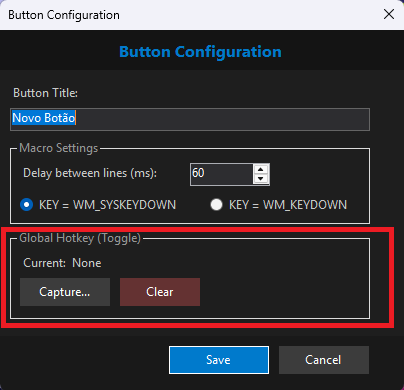
Each macro has two independent hotkeys. Right-click → ⚙️ Configure to set them.
- Start hotkey — triggers the macro from anywhere
- Stop hotkey — stops it without needing to click the button, useful for looping scripts
Both work even when Keymatic is minimized to the tray.
🪟 Window Manager
Right-click → 🪟 Manage Windows
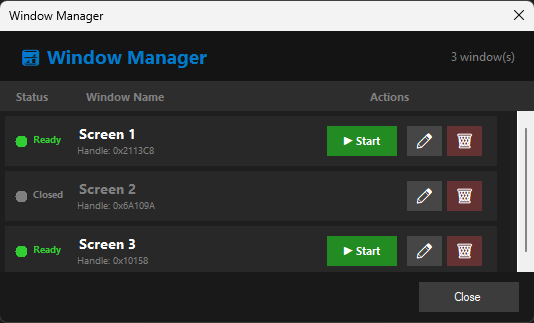
| Action | Description |
|---|---|
| ▶ Start | Starts the script only for this window |
| ⏹ Stop | Stops the script only for this window |
| ✏️ Rename | Renames the displayed window |
| 🗑️ Remove | Removes the window from the macro |
| Status | Meaning |
|---|---|
| 🟢 Ready | Window is open and ready |
| 🟡 Running | Script is running for that window |
| ⚫ Closed | Window is closed |
❓ FAQ
The script does not work on the target window
- Make sure the window was captured correctly
- Some apps block simulated input
- Try running Keymatic as Administrator
Keys are sent "twice"
Increase Line delay and/or add DELAY between commands.
WAIT is not running
- WAIT runs in parallel to the main loop
- Use a valid time in milliseconds
- Close the block with ENDWAIT
I accidentally reordered a button while capturing a window
Drag the button back to the original position. Reordering only triggers when you release the mouse inside the Keymatic panel. Releasing outside always captures the window.
📧 Contact
GitHub: @SuportKeymatic
Support: suportlm001@gmail.com
Reporting a bug
Send an email with:
• what you were doing
• what happened (a screenshot helps)
• your Windows version
☕ Support the project
Keymatic is free and maintained by an independent developer. If it saves you time, consider buying a coffee — it helps keep the project alive.
Any support keeps Keymatic moving forward.